Embedding web content
Overview
The Avalonia WebView component provides native web browser functionality for your Avalonia applications. Unlike embedded WebView solutions that require bundling Chromium, this implementation leverages the platform's native web rendering capabilities, resulting in smaller application size and better performance.
The WebView component includes three main APIs:
NativeWebView- A control for embedding web content directly in your application UINativeWebDialog- A separate dialog window that hosts web contentWebAuthenticationBroker- A utility for handling OAuth and web-based authentication flows
The WebView component is available with both Avalonia Accelerate and Avalonia XPF. All functionalities and configuration options are shared by both.
Installation
- Accelerate
- XPF
See the Installation Guide for step-by-step instructions on how to install Accelerate components.
Add the WebView package to your project:
dotnet add package Avalonia.Controls.WebView
First of all, make sure you have installed XPF nuget feed as per instruction.
With nuget feed working, install Avalonia.Xpf.Controls.WebView package:
<PackageReference Include="Avalonia.Xpf.Controls.WebView" Version="11.3.9" />
Please use latest version if available. You can check newer versions in the IDE NuGet Packages window.
On Windows, when WebView2 is not available, legacy Internet Explorer is embedded. It's useful when targeting older Windows versions.
Basic Usage
NativeWebView
Embeddable NativeWebView is not supported on Linux. Please use NativeWebDialog instead.
- Accelerate
- XPF
<Window xmlns="https://github.com/avaloniaui"
        xmlns:x="http://schemas.microsoft.com/winfx/2006/xaml">

    <NativeWebView Source="https://avaloniaui.net/"
                   NavigationCompleted="WebView_NavigationCompleted" />
</Window>
private void WebView_NavigationCompleted(object? sender, WebViewNavigationCompletedEventArgs args)
{
    if (args.IsSuccess)
    {
        // Navigation completed successfully
    }
}
Add xmlns:wpf="clr-namespace:Avalonia.Xpf.Controls;assembly=Avalonia.Xpf.Controls.WebView" xmlns to your XAML file.
Typical usage of the NativeWebView looks like this:
<wpf:NativeWebView Source="https://avaloniaui.net/" />
Where Source is a bindable property.
To streamline code migration, it's also possible to use NativeWebView control with native WPF on Windows. Without XPF involving. In this scenario, all the API members and underlying browsers are the same. As well as steps to install, the same package can be used.
Bidirectional JavaScript execution
In some situations it's necessary to execute arbitrary JavaScript code from the web view control.
NativeWebView provides InvokeScript async method:
webView.InvokeScript("console.log('Hello World')");
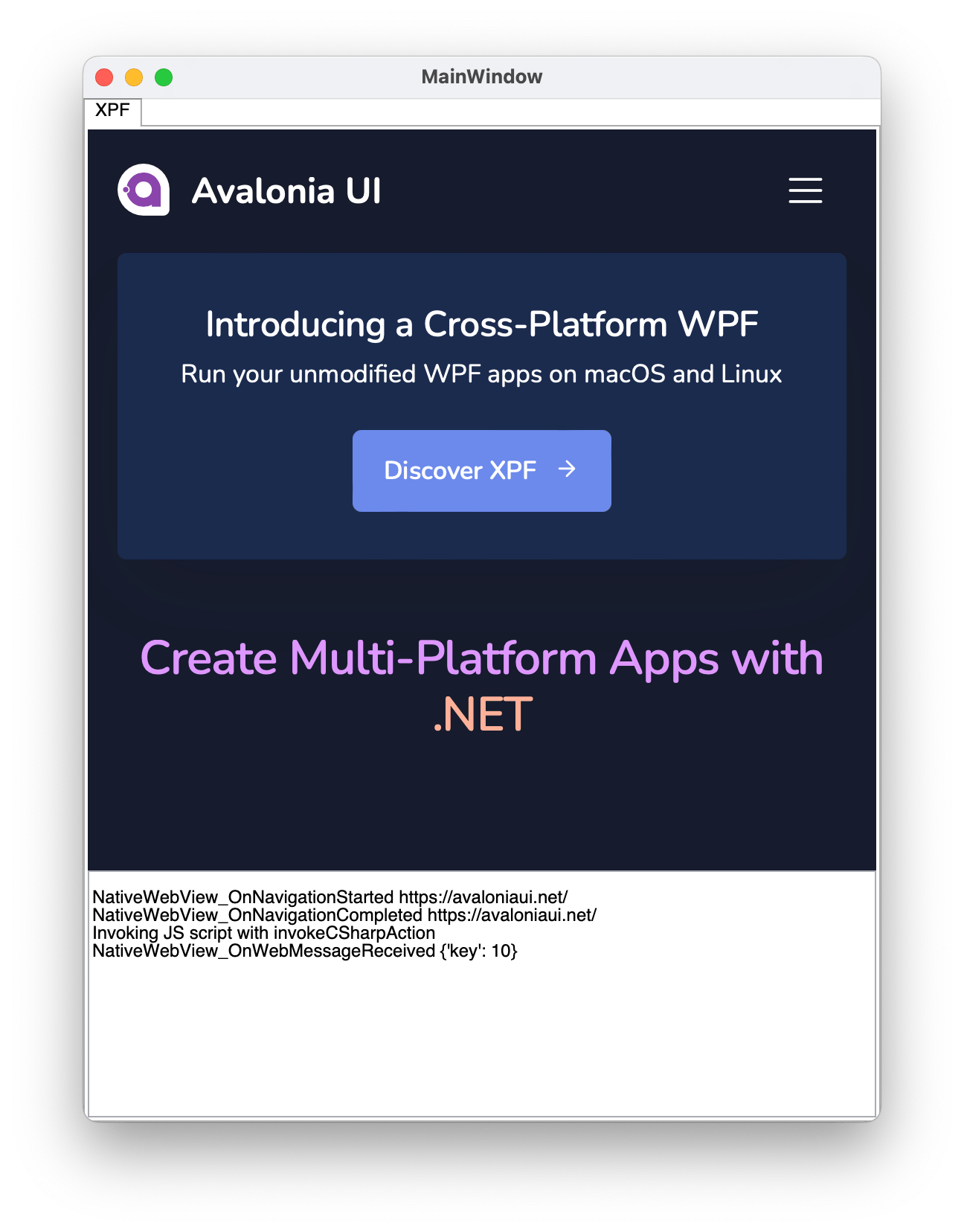
When it's required to receive a data from the JavaScript (web page) and process it on the C# side, you can use NativeWebView.WebMessageReceived event combined with invokeCSharpAction helper JS method.
Complete bi-directional example looks like this:
private async void NativeWebView_OnNavigationCompleted(object? sender, WebViewNavigationCompletedEventArgs e)
{
    await ((NativeWebView)sender!).InvokeScript(""" invokeCSharpAction("{'key': 10}") """);
}

private void NativeWebView_OnWebMessageReceived(object? sender, WebMessageReceivedEventArgs e)
{
    var message = e.Body;
    // message == "{'key': 10}"
}
NativeWebDialog
var dialog = new NativeWebDialog
{
    Title = "Avalonia Docs",
    CanUserResize = true,
    Source = new Uri("https://docs.avaloniaui.net/")
};

dialog.NavigationCompleted += (s, e) =>
{
    if (e.IsSuccess)
    {
        // Navigation completed successfully
    }
};

dialog.Show();
WebAuthenticationBroker
var authOptions = new WebAuthenticatorOptions(
    RequestUri: new Uri("https://accounts.google.com/o/oauth2/auth?response_type=code&client_id=YOUR_CLIENT_ID&redirect_uri=http://localhost&scope=openid"),
    RedirectUri: new Uri("http://localhost")
);

var result = await WebAuthenticationBroker.AuthenticateAsync(mainWindow, authOptions);

if (result.CallbackUri != null)
{
    // Process authentication result
    var code = HttpUtility.ParseQueryString(result.CallbackUri.Query)["code"];
}
Replace YOUR_CLIENT_ID with the client ID for your application.
Platform Prerequisites
The WebView component relies on native web rendering implementations that must be available on the user's machine.
Summary
| Component | Windows | macOS | Linux | iOS | Android | Browser |
|---|---|---|---|---|---|---|
| NativeWebView | ✔ | ✔ | ✖* | ✔ | ✔ | ✖ |
| NativeWebDialog | ✔ | ✔ | ✔ | ✖ | ✖ | ✖ |
| WebAuthenticationBroker | ✔** | ✔ | ✔** | ✔ | ✔*** | ✔**** |
* For Linux, use NativeWebDialog instead of NativeWebView
** Uses NativeWebDialog implementation
*** Android support is experimental
**** Requires CORS configuration for the redirect page. .NET 10 is also necessary to run this library in browser.
Windows
Uses Microsoft Edge WebView2, which is:
- Pre-installed on Windows 11
- May need installation on Windows 10
For Windows 10 users, you can include the WebView2 runtime with your installer:
macOS/iOS
Uses WKWebView which is pre-installed on all modern macOS/iOS devices.
- No additional setup required
- For WebAuthenticationBroker: macOS 10.15+ or iOS 12.0+ required
Linux
Requires GTK 3.0 and WebKitGTK 4.1:
Debian/Ubuntu:
apt install libgtk-3-0 libwebkit2gtk-4.1-0
Fedora:
dnf install gtk3 webkit2gtk4.1
NativeWebDialog also supports libwebkit2gtk-4.0 and soup-2.4 for older Ubuntu distributives. But it is recommended to use libwebkit2gtk-4.1.
Android
Requires Android API 21 or higher.
Native Browser interop
The Avalonia WebView component provides cross-platform web content rendering capabilities by utilizing native platform web view. However, sometimes you need to access platform-specific APIs that aren't exposed through the Avalonia WebView abstraction layer.
This document explains how to obtain native handles and perform interop with the underlying browser implementations on each supported platform.
Getting handle
To access native browser functionality, you first need to obtain the platform-specific handle from your WebView control.
For WebView Controls
Use the TryGetPlatformHandle() method on your WebView instance:
if (myWebView.TryGetPlatformHandle() is IWindowsWebView2PlatformHandle handle)
{
    // Cast to platform-specific interface and use
}
For WebView Dialogs
Use the TryGetWebViewPlatformHandle() method on your WebView dialog instance:
if (myWebViewDialog.TryGetWebViewPlatformHandle() is IWindowsWebView2PlatformHandle handle)
{
    // Cast to platform-specific interface and use
}
Interop
Windows
Avalonia's WebView on Windows supports two adapters:
- WebView2: Modern Chromium-based Edge (recommended)
- WebView1: Legacy Edge (fallback for older Windows 10 installations without WebView2)
Both adapters operate with classic COM interop.
IDL definition files can be found in the Microsoft.Web.WebView2 nuget package (in case of WebView2), Windows SDK (in case of WebView1) or on the internet.
Recommended Approach: Use the new [GeneratedComInterface] attribute for fast, trimmer/AOT-friendly COM interop.
Alternative Solutions:
public interface IWindowsWebView2PlatformHandle : IPlatformHandle
{
    /// Returns COM handle to the ICoreWebView2 [76ECEACB-0462-4D94-AC83-423A6793775E] COM interface
    IntPtr CoreWebView2 { get; }
    /// Returns COM handle to the ICoreWebView2 [4D00C0D1-9434-4EB6-8078-8697A560334F] COM interface
    IntPtr CoreWebView2Controller { get; }
}
public interface IWindowsWebView1PlatformHandle : IPlatformHandle
{
    /// Returns COM handle to the IWebViewControl [3F921316-BC70-4BDA-9136-C94370899FAB] COM interface.
    IntPtr WebViewControl { get; }
}
MacOS/iOS
Recommended Approach: Use official .NET Xamarin.Native macOS/iOS bindings for strongly-typed wrappers. Typically using NSObject.GetNSObject<WKWebView>(IntPtr, false).
var wkWebView = NSObject.GetNSObject<WKWebView>(handle.WKWebView, false);
Alternative: Use objc_msgSend P/Invokes for direct native API access (more control but harder to maintain).
public interface IAppleWKWebViewPlatformHandle : IPlatformHandle
{
    IntPtr WKWebView { get; }
    IntPtr GetWKWebViewRetained();
}
GTK Linux
GTK interop provides direct access to WebKitWebView but requires careful thread synchronization.
Important: All GTK calls must be executed on the GTK thread. Use GtkInteropHelper.RunOnGlibThread from the Avalonia.X11 assembly (included with Avalonia.Desktop).
The provided WebKitWebView IntPtr can be used directly with WebKit P/Invokes from the official WebKit reference.
public interface IGtkWebViewPlatformHandle : IPlatformHandle
{
    IntPtr WebKitWebView { get; }
}
Example Usage:
GtkInteropHelper.RunOnGlibThread(() =>
{
    // Your WebKit P/Invoke calls here
});
Android
Use official .NET Xamarin.Android bindings for the easiest managed wrapper access.
Refer to the Android.Webkit.WebView documentation for usage details.
public interface IAndroidWebViewPlatformHandle : IPlatformHandle
{
    IntPtr WebKitWebView { get; }
}
Have questions or feedback? Join the conversation below.