Avalonia for Visual Studio extension
Features
The Avalonia for Visual Studio extension provides an enhanced way of working with Avalonia XAML files. It does this by providing:
- An enhanced editor with deep integrations for a rich editing experience.
- A Previewer so you can see what the UI will look like without having to run the application.
Installation
See our Getting Started guide for instructions to install the Avalonia for Visual Studio extension.
Enhanced Editor
The editor for Avalonia XAML includes the following capabilities:
- Smarter, more helpful Intellisense while typing.
- Error highlighting and fix suggestions.
- Automatic XAML namespace imports.
- Full colorization of the XAML.
- "Go To Definition" navigation.
- Intelligent hover tips.
- Automatic document formatting.
- Outlining of the document so you can collapse elements.
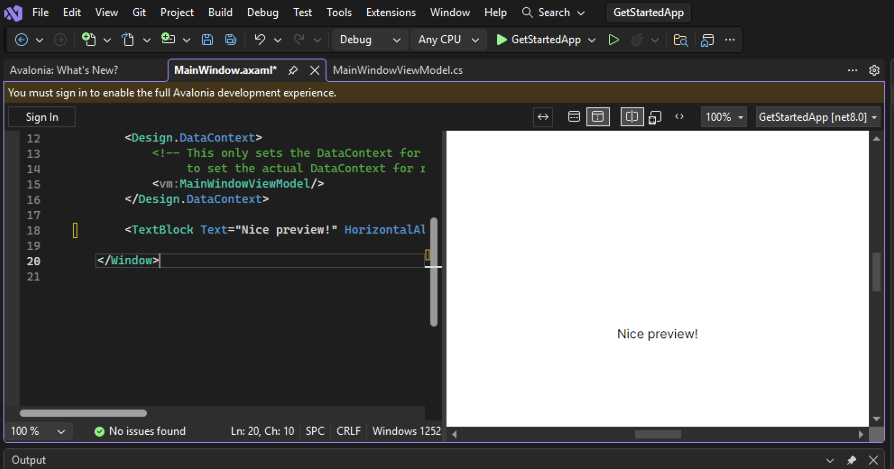
Previewer
The previewer allows you to see what the UI of the open document will look like without needing to run the application.
For more information, please see Previewing your UI design.
Settings
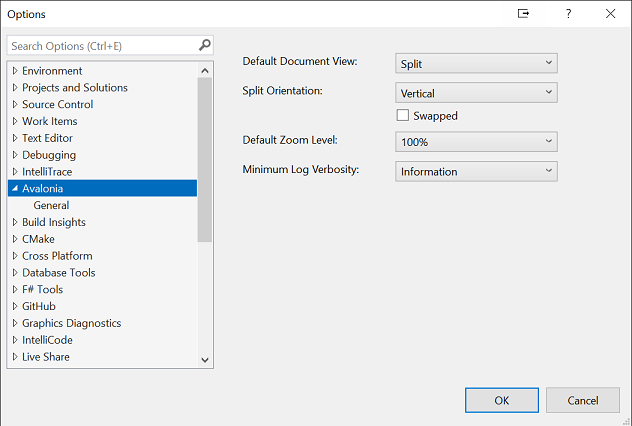
Multiple options are provided to allow you to configure the way the editor and previewer behave.
These can be accessed by selecting Options from the Tools menu inside Visual Studio.
| Setting | Description | Options |
|---|---|---|
| Default Document View | What is displayed when a document is opened | Split (Default) - Both the code and the previewer Design - Just the previewer Source - Just the source code |
| Split Orientation | Whether to split the orientation horizontally or vertically | Horizontal (Default) - The editor and previewer are displayed side by side Vertical - The editor and previewer are displayed one above the other |
| Swapped | Whether the default position of the editor and previewer should be inverted when opening a document in 'Split' mode | True if checked |
| Default Zoom level | How to size the content in the | 100% (Default) Various percentages Fit to Width - Allow the preview to take the full width of the available space Fit All - Fill the entire previewer |
| Minimum Log Verbosity | The minimum LogLevel for information output by the extension | Trace Debug Information (Default) Warning Error Critical None |
Have questions or feedback? Join the conversation below.