Creating mouse and keyboard shortcuts
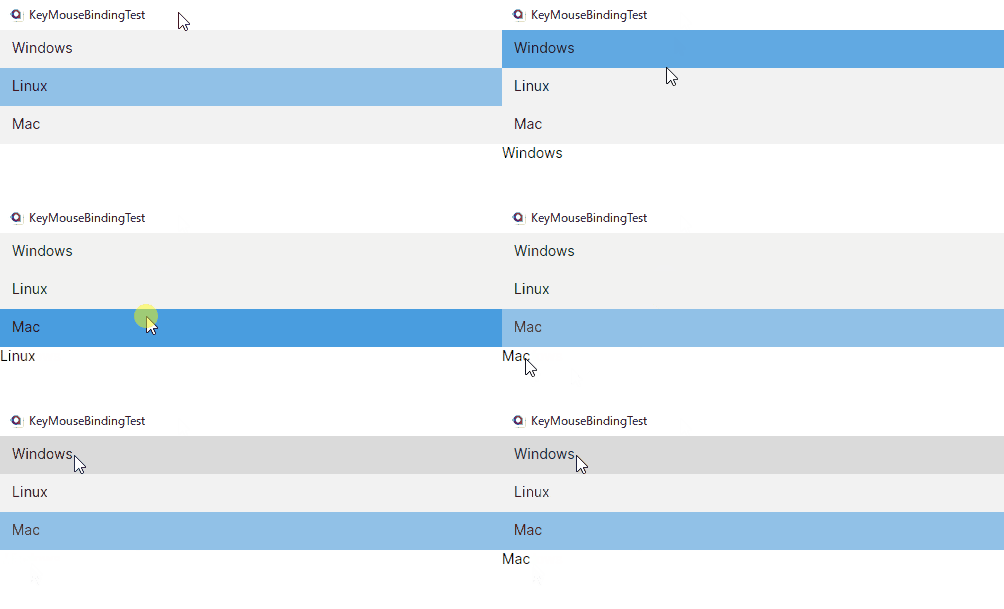
Here is an example of how to bind shortcut keys commonly used in business tools, e.g. using a double-click or the Enter key in a simple list box.
- XAML
- CodeBehind
- ViewModel
<UserControl ..>
    <StackPanel>
        <ListBox
            DoubleTapped="ListBox_DoubleTapped"
            ItemsSource="{Binding OperatingSystems}"
            SelectedItem="{Binding OS}">
            <ListBox.KeyBindings>
                <!--  Enter  -->
                <KeyBinding Command="{Binding PrintItem}" Gesture="Enter" />
                <!--
                    MouseBindings are not supported.
                    Instead, handle it in the view's code-behind. (DoubleTapped event)
                -->
            </ListBox.KeyBindings>
        </ListBox>
        <TextBlock Text="{Binding Result}">
            <TextBlock.ContextMenu>
                <ContextMenu>
                    <!--  Right Click  -->
                    <MenuItem Command="{Binding Clear}" Header="Clear" />
                </ContextMenu>
            </TextBlock.ContextMenu>
        </TextBlock>
    </StackPanel>
</UserControl>
public partial class MainView : UserControl
{
    public MainView()
    {
        InitializeComponent();
    }

    private void ListBox_DoubleTapped(object? sender, Avalonia.Input.TappedEventArgs e)
    {
        if (DataContext is MainViewModel vm)
        {
            vm.PrintItem.Execute(null);
        }
    }
}
public class MainViewModel : ViewModelBase
{
    public List<string> OperatingSystems =>
    [
        "Windows",
        "Linux",
        "Mac",
    ];
    public string OS { get; set; } = string.Empty;

    [Reactive]
    public string Result { get; set; } = string.Empty;

    public ICommand PrintItem { get; }
    public ICommand Clear { get; }

    public MainViewModel()
    {
        PrintItem = ReactiveCommand.Create(() => Result = OS);
        Clear = ReactiveCommand.Create(() => Result = string.Empty);
    }
}
Have questions or feedback? Join the conversation below.