Resources tool
The Resources Tool provides a view of your application's resource hierarchy, allowing you to inspect, navigate, and modify resources at runtime. This tool is invaluable for understanding how resources are organized and resolved in your Avalonia application.
In a resource lookup, Avalonia searches through this hierarchy until it finds a matching key. The Resources Tool visualizes this application-level hierarchy and helps you understand which resources are available globally in your application.
You can read more about Avalonia Resources on this documentation page - How To Use Resources.
Control-specific resources (those defined on individual controls or within control templates) are not currently displayed in this tool.
Navigating Resource Providers tree
The left panel displays a tree of resource providers, which include:
- Application (root level)
- Resource Dictionaries
- Theme Dictionaries
- Styles
- Other non-dictionary Resource Providers
Each node in the tree represents a resource scope. Selecting a node displays its resources in the right panel.
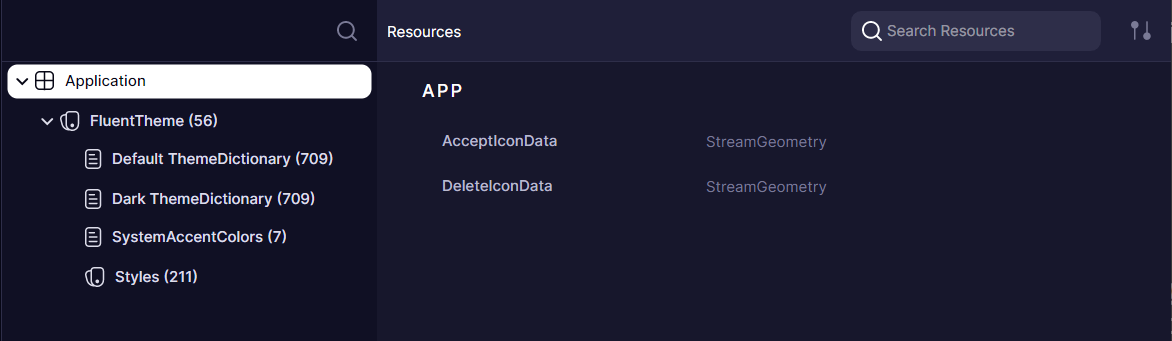
Inspecting and Editing resources
The right panel shows resources available in the selected provider.
Resources can be edited directly in this view, allowing you to experiment with different values and see the changes reflected immediately in your application.
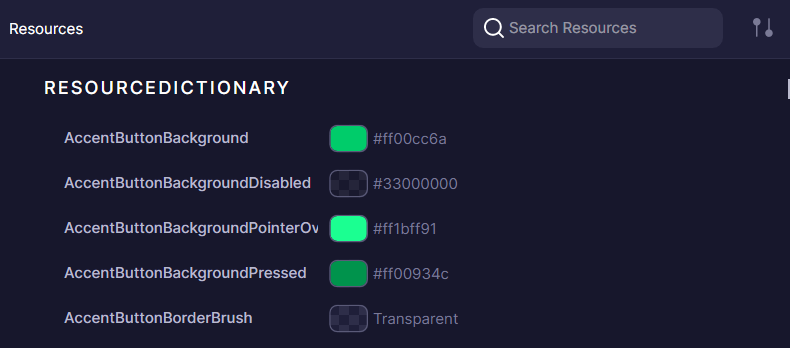
Adding new resources to the provider is not yet supported
Filtering and Sorting
The Resources Tool offers several options to help you find specific resources:
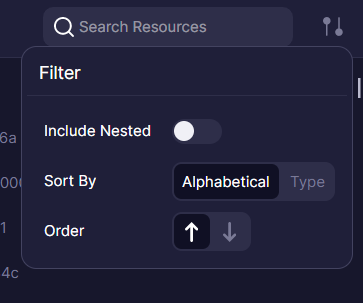
- Include Nested - When enabled, shows all resources available at the selected node and its children, simulating how resource lookup works at runtime. This helps identify which resources are accessible from a specific point in the hierarchy.
- Sort by - Arrange resources alphabetically by key or grouped by type
- Order - Sort in ascending or descending order
- Search filter - Search for resources by key or type
Have questions or feedback? Join the conversation below.